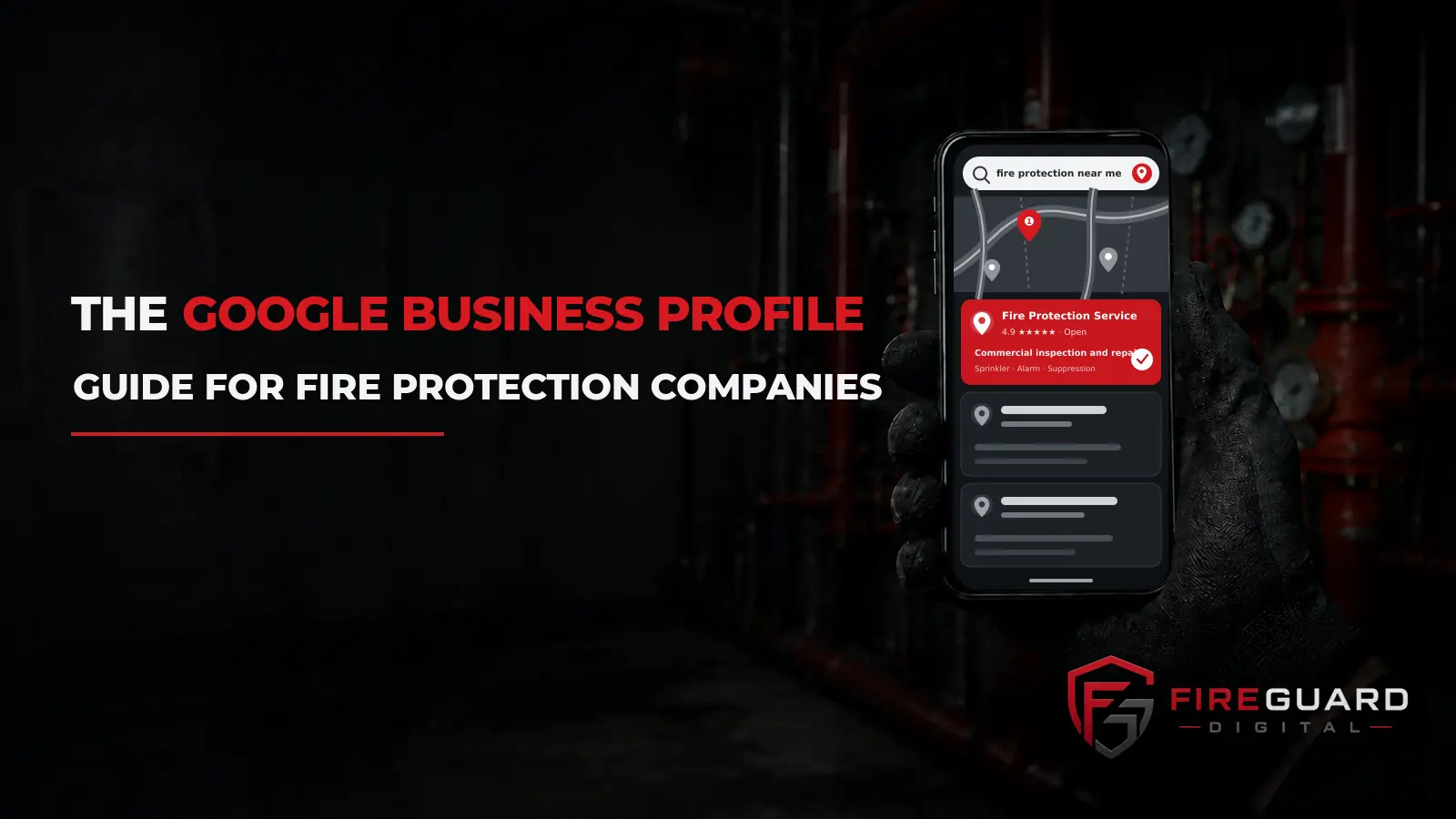
The Google Business Profile Guide for Fire Protection Companies
A hood tag expired last month. A panel is faulting. An inspection is overdue and the usual contractor has not called back.
The facility manager pulls out his phone.
He does not scroll. He taps one of the three companies Google shows him at the top.
That box is the whole shortlist. If you are not in it, you were never in the running.
Your Google Business Profile decides whether you are in that box. It is free. And most fire protection companies have barely touched it.
This fire protection Google Business Profile guide fixes that.
I have spent ten years running SEO and Google Ads. I’m also an active firefighter. I built FireGuard Digital to work with fire protection companies and nobody else.
Here is what you get. Seven steps, in order. A simple test for every field on your profile. And the mistakes that get profiles shut off.
Read it start to finish, or jump to what you need.
Let’s go.
Table of Contents
What a Google Business Profile Does for a Fire Protection Company
Your Google Business Profile is the free listing that decides whether you show up in the map pack.
The map pack is the box of three businesses Google puts at the top of a local search. Above the regular results. Above everything.
Most owners treat the profile like a directory listing. Something you fill out once and forget about.
For this trade it is the storefront.
A facility manager with a deadline does not browse. He looks at three options, glances at the reviews, and calls one. A lot of the time he never reaches anybody’s website at all.
Local search runs on three things:
- Your Google Business Profile. This is the box.
- Your website. This is where a buyer checks you out if he keeps looking.
- What other sites say about you. This is how Google decides who to trust.
This guide is the first one.
If you want the website side, that is the complete fire protection SEO guide. And if your site is old or was never built for search, start with a fire protection website built for search instead. A perfect profile pointing at a broken website still loses.
How Google Decides Who Shows Up in the Map Pack
Google tells you what it uses. Most agencies invent their own list instead.
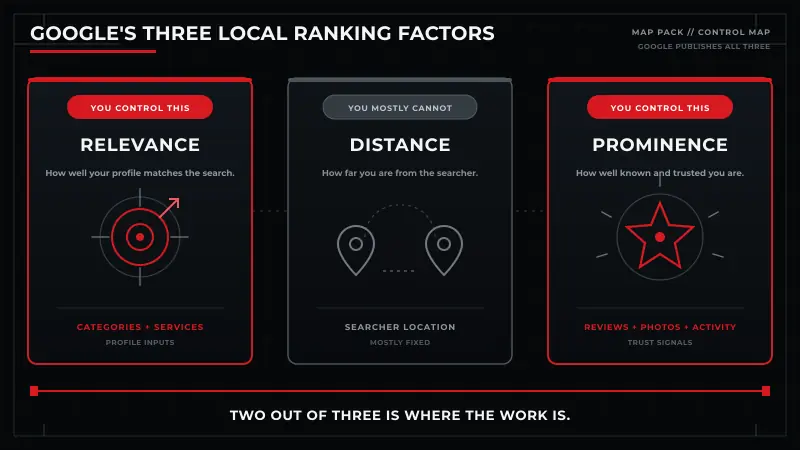
There are three factors: relevance, distance, and prominence.
Relevance. How well your profile matches what somebody searched for.
Distance. How far you are from the person searching.
Prominence. How well known and well regarded your business is.
Now the part that matters.
You cannot move distance. You can move the other two.
Distance is measured from the searcher, not from your office. Somebody standing in a building across town is closer to your competitor than to you. Nothing on your profile changes that.
That answers a question I get all the time. “How is a company two towns over outranking me in my own city?”
Because distance is only one of three. A stronger profile can beat a closer one.
Relevance is steps 2 and 4 below. Your categories and your services list tell Google what you actually do.
Prominence is steps 5, 6, and 7. Reviews, photos, activity, and what the rest of the web says about you.
Five of the seven steps in this guide move relevance or prominence. That is not an accident.
One more thing, because owners ask about it often.
You do not target “near me” searches. You earn them. Google picks who to show based on distance, a complete profile, and location signals. There is no phrase to add. There is only the work.
Why Most Fire Protection Profiles Look Residential
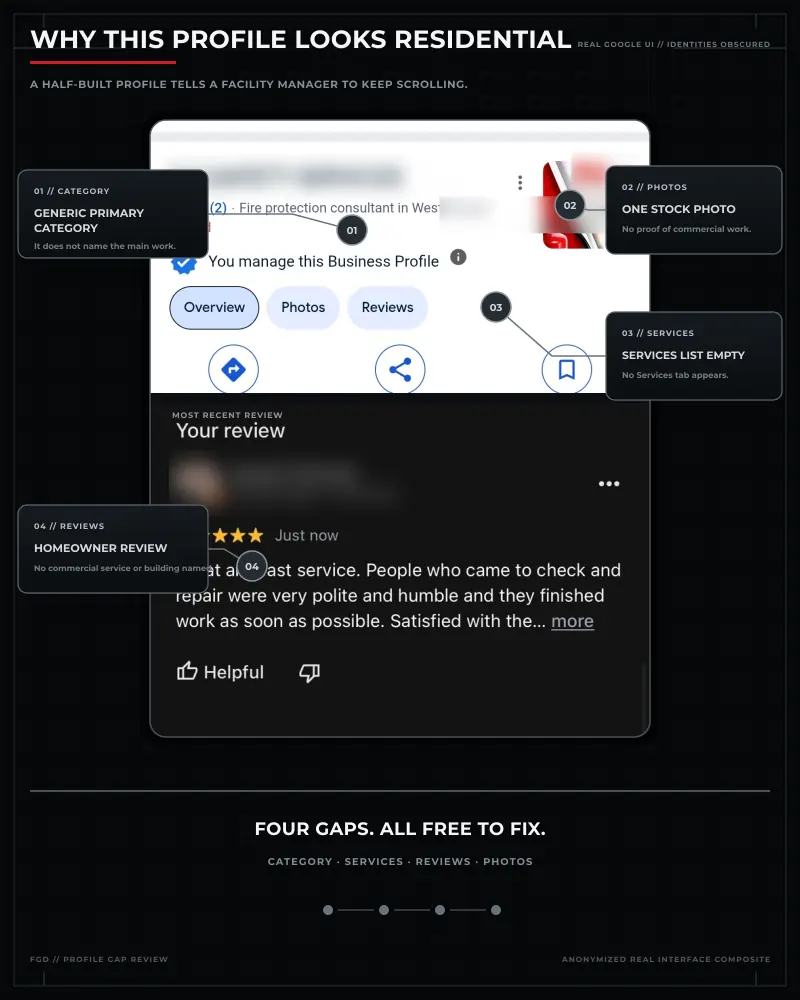
I have reviewed hundreds of fire protection profiles across the US and Canada.
The same four things are almost always true.
The primary category is generic, or wrong. The services list is empty. The photos are a logo and a stock truck. And the reviews, when there are any, are from homeowners.
Every one of those is a signal. They all point the same direction.
Google reads them and files you as a residential company. So does the facility manager scrolling past you.
You are not losing the map pack because you do bad work.
You are losing it because your profile describes a different business than the one you run.
That is the good news, by the way. Signals are free to change. Nobody has to approve a budget.
I broke down the wider version of this in why most fire protection companies are invisible on Google. This guide is the profile half of it.
Want to see what your profile looks like to a facility manager? Get a free fire protection marketing audit. No pitch. Just a look at what is there.
The Commercial Signal Test
Everyone says optimize your profile.
Nobody tells you what optimized means.
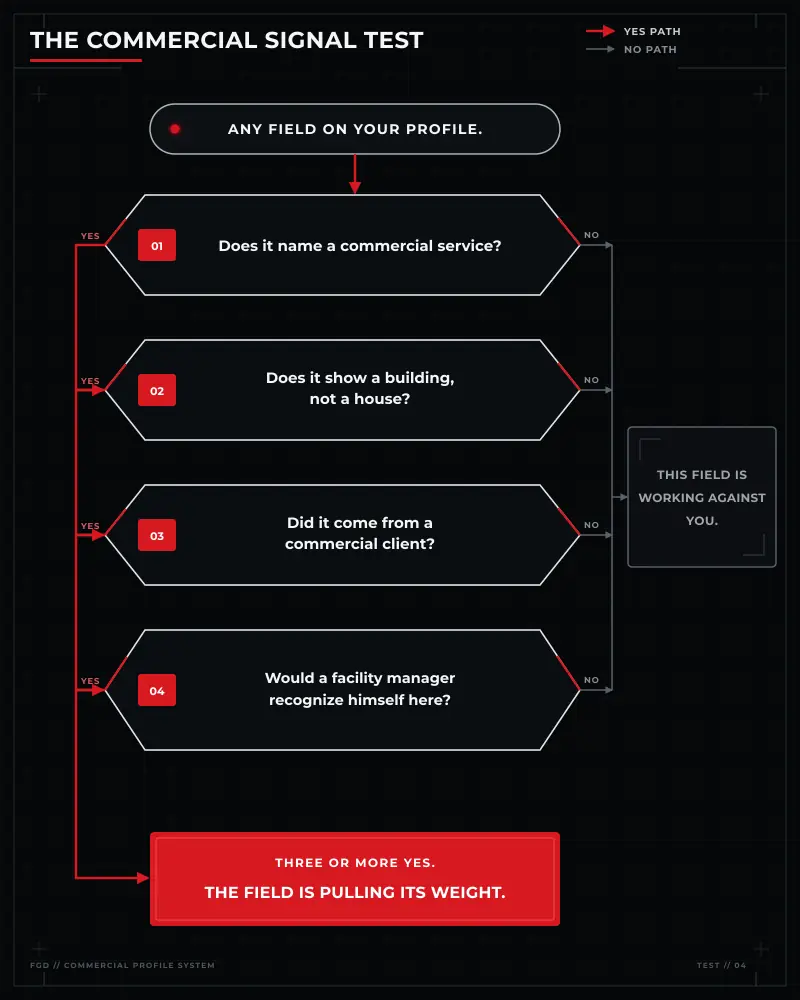
Here is the test. Run it on any field. It takes about five seconds.
The Commercial Signal Test
- Does it name a commercial service, not a general trade?
- Does it show a building, not a house?
- Did it come from a commercial client?
- Would a facility manager recognize himself in it?
Three or more yes answers and the field is pulling its weight.
| Reads residential | Reads commercial |
|---|---|
| Primary category: Fire alarm supplier | Primary category: Fire protection service |
| Services list: empty | Sprinkler ITM, backflow test, kitchen hood suppression inspection |
| Newest review: a homeowner thanking you for a smoke alarm | A facilities director naming a completed inspection |
| Photos: a logo and a stock fire truck | A riser room, a control panel, a tech on a lift |
| Description: family owned since 1998 | Commercial fire protection for schools, warehouses, and multi-tenant buildings |
| Service areas: one whole state | Six named cities you actually run services in |
Notice what you are not doing here.
You are not adding anything. Every one of those fields already exists on your profile. They are filled in wrong, or not at all.
That is why this is the quickest work in the whole system. You are correcting, not building.
How to Set Up a Google Business Profile for a Fire Protection Company: The 7-Step Build Order
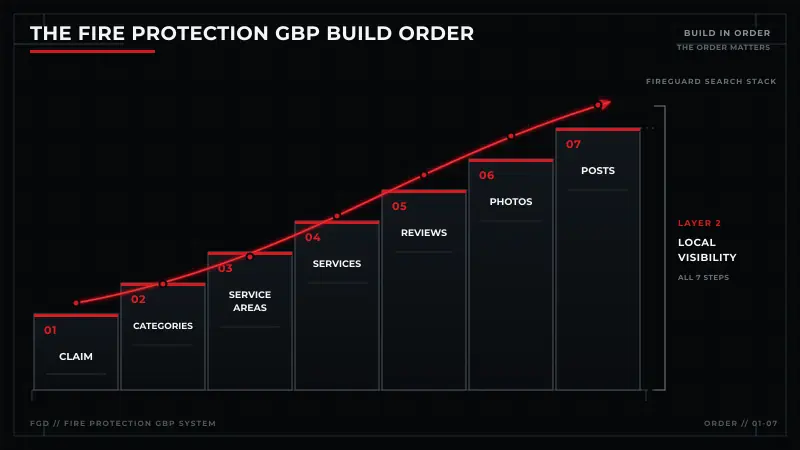
TThe FireGuard Search Stack is the system. This is Layer 2, Local Visibility. These seven steps are how you build it.
The Fire Protection GBP Build Order
- Claim the profile and verify it.
- Set your primary category before you touch anything else.
- Set your address and service areas the way Google expects.
- Fill the services list with the words buyers type.
- Collect reviews from commercial clients.
- Add photos of the actual work.
- Post, and keep posting.
The order matters.
Step 2 decides whether any of the rest can work. Get the category wrong and you are competing in the wrong group, and nothing else on the profile pulls you back.
Step 1: Claim the Profile and Verify It
Search Stack layer 2: Local Visibility
There is probably already a profile for your business.
Google creates them automatically. Or a former employee made one. Or a marketing company set one up years ago and nobody has the login anymore.
Claiming is how you take control of it.
Search your company name on a phone, in a private (incognito) window. See what comes up.
If two listings show up, that is your first job. Duplicates split your signals. Two half-strength profiles rank worse than one real one. You want them merged or removed, not ignored.
Then verify. Google needs to confirm you are who you say you are. That might be a postcard, a phone call, or a video walkthrough of your shop.
I am not going to tell you which one you will get. Google varies it by business type and changes it regularly. Do whichever one it asks for.
One thing worth knowing before you start. Google’s GBP guidelines decide what is allowed on a profile. Read them once. Most suspensions start with something in that document.
Step 2: Pick the Right Categories
Search Stack layer 2: Local Visibility
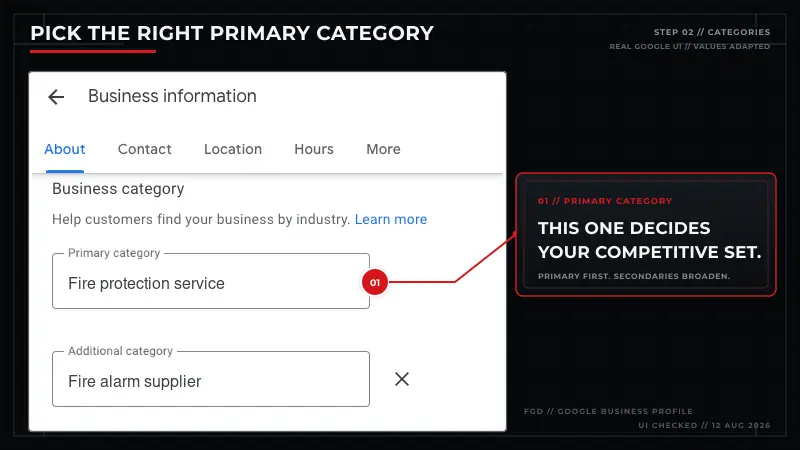
Most fire protection companies should set Fire protection service as the primary category.
That one field decides which businesses you compete against.
Get it right and you are in the race with other fire protection companies. Get it wrong and you are in a different race, and nothing else on the profile pulls you back.
Here is what that looks like in practice. A company set to Fire alarm supplier is telling Google it sells equipment. A facility manager searching for an inspection contractor may never see it.
Then add secondary categories. Google has several that fit this trade:
- Fire protection service
- Fire alarm supplier
- Fire protection consultant
- Fire protection system supplier
- Fire protection equipment supplier
Secondaries broaden what you can show up for. They do not change your main race.
Now the discipline part.
Only add what you actually do. Every category you cannot back up waters down your relevance. Five accurate categories beat nine hopeful ones.
And your list should not match your competitor’s list.
An alarm-only contractor, a sprinkler contractor, and a full-service company do different work. Their categories should look different. Most of the time they look identical, because somebody copied somebody.
Go look at yours right now. Open your profile and read the primary category out loud. Does it say what you actually sell?
Not sure what yours is set to? Get us to audit your GBP profile and we will tell you.
Step 3: Set Your Address and Service Areas the Way Google Expects
Search Stack layer 2: Local Visibility
Two questions come up every time. Here are both answers.
Do I have to show my address?
No. If buyers do not come to you, hide it. If you run the business out of your house, you want to use the service area option and not display your address publicly.
You still give Google a real address so it can verify you. It just does not get shown to anyone.
How many service areas should I add?
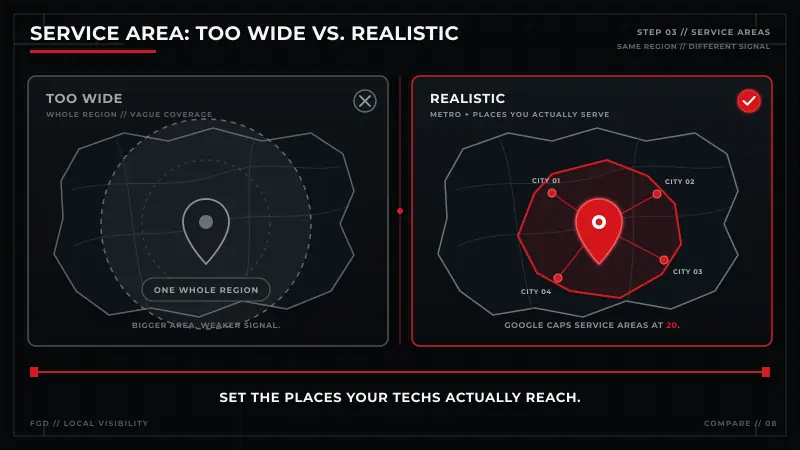
Google allows up to 20. It expects them to be places you can actually reach.
Now the part that feels backwards.
Covering more ground does not extend your reach. It shrinks it.
Set your service area to a whole state/province and you have told Google you are vaguely everywhere. Vague does not rank. It also looks like the kind of overreach that gets profiles suspended.
So pick them the way you would plan a route.
Where do your techs actually drive in a normal week? Where do you already know the AHJ that inspects and enforces in that area? Those are your service areas.
Not the places you would take a job if somebody happened to call.
Three real markets beat twenty hopeful ones.
Google explains service area businesses here if you want the rules in their own words.
This is one piece of the wider fire protection local search work. The profile sets your coverage. Your website has to back it up.
Step 4: Fill the Services List With the Words Buyers Type
Search Stack layer 2: Local Visibility
The services list is blank on most fire protection profiles.
It is one of the few places you get to tell Google, in your own words, exactly what you sell. And it sits empty.
Fill it the way a buyer types it. Not the way your office says it.
- sprinkler ITM
- backflow test
- kitchen hood suppression inspection
- fire alarm deficiency repair
- fire pump testing
- annual extinguisher service
ITM stands for inspection, testing, and maintenance. It is how a lot of commercial buyers describe the recurring work they shop for.
Buyers also type code numbers. “NFPA 25 inspection” is a real search. So is “NFPA 72 fire alarm inspection.” They use the number because it is printed on the report in their hand. NFPA publishes the standards this trade runs on, and buyers borrow the names.
If you do that work, put it in the list.
There is also a description field under each service. Almost nobody fills it in.
Use it. Say who the service is for and what buildings you do it in. “Annual inspection and testing for multi-tenant office, retail, and warehouse properties” tells a buyer more than the service name alone ever will.
Every trade’s list looks different. You can see how that plays out by trade on our Industries page, or go straight to fire alarm company marketing or fire sprinkler company marketing. grow in.
Step 5: Get Reviews From Commercial Clients
Search Stack layer 2: Local Visibility
Most fire protection companies are in one of two spots.
Either you have almost no reviews at all. Or you have some, and they are mostly from homeowners.
Neither one helps you win commercial work.
Here is why it happens, and it is not your fault.
A homeowner leaves a review because the visit was memorable. Something was wrong, you showed up, you fixed it.
A facilities director does not. You did a scheduled inspection correctly, which is exactly what he expected. Nothing memorable happened. That is the job.
So the only reviews you get are the ones you never had to ask for. And they describe a business you are trying to grow away from.
The fix is a process, not a campaign.
Ask at the moment of completion. The inspection is done. The deficiency is cleared. The person is standing there and satisfied. That is the window, and it closes fast.
Ask the person who benefited. The facilities director. The property manager. Not the accounts payable contact who never saw the work.
Make it one link. Not instructions. Not a QR code on an invoice nobody opens. One link, one tap.
Ask for something specific. Not “leave us a review.” Try “if you could mention the building type and what we did, it helps other property managers know we handle this kind of work.” A review naming a warehouse inspection is worth more than five that say great service.
Then answer them. All of them!
Reply in a sentence that names the service. Those replies are text on your profile too.
One thing I will not do is give you a number to hit. There is no magic review count. Anyone who quotes you one made it up. A handful of detailed commercial reviews will do more than a pile of thin ones.
And you can ask. You cannot pay. Incentives break Google’s rules and put the whole profile at risk.
Want a review process built for commercial clients that runs without you having to remember it? That is a system, and it is one we build.
Step 6: Add Photos That Show the Work
Search Stack layer 2: Local Visibility
Most fire protection profiles have a logo and maybe a stock photo of a service truck.
That tells a facility manager nothing.
Here is what to put up instead:
- A riser room
- A fire alarm control panel with the cover off
- A tech on a lift
- A commercial kitchen hood
- A backflow assembly
- A service van parked in front of an office building, not a house
He is looking for evidence you work in buildings like his. A photo does that in a second.
Take them with a phone. They do not need to be pretty. They need to be real.
Two rules before you post anything.
Get permission before you photograph a client site. And never post anything that shows a security weak point or a documented deficiency at a building somebody could identify. That is a liability you do not need.
Then keep it going. A few new photos a month beats a hundred uploaded once and never touched again.
Step 7: Post, and Keep Posting
Search Stack layer 2: Local Visibility
A Google Post is a short update on your profile.
It is not social media. Nobody is following you. Nobody is waiting for the next one.
Its job is simpler than that. It shows Google and a buyer that this business is still running.
Post the same commercial material as everything else in this guide. An inspection type you just finished. A service you want more of. A seasonal reminder that lines up with a real compliance rhythm in your market.
A few times a month is plenty. Consistent beats frequent.
Now the part most guides still get wrong.
The Q&A section is gone.
Almost every Google Business Profile guide online tells you to write your own questions and answers. That advice is dead.
Google retired the Q&A feature and replaced it with an AI tool called Ask Maps. It answers questions using information from across the web instead of from a list you seeded yourself.
So you cannot feed it directly anymore.
What feeds it now is everything else. Your categories. Your services list. Your reviews. Your website.
Which is another way of saying steps 2 through 6 just got more important, not less.
Why Profiles Get Suspended, and How to Avoid It
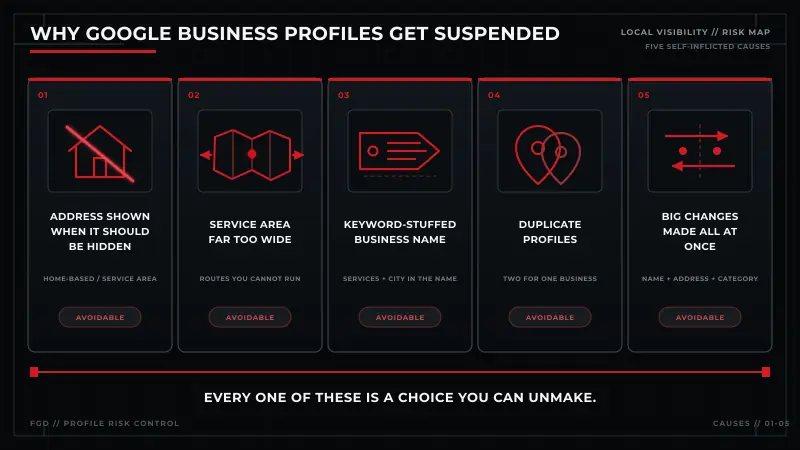
Your Google Business Profile is the only marketing asset you own that somebody else (Google) can switch off.
When it happens you do not drop a few spots. You disappear from local search.
The causes are almost always self-inflicted. Here they are:
- Showing an address you should have hidden. Most common with home-based businesses.
- A service area far wider than you can serve. Covered in step 3.
- Keywords stuffed into the business name. “ABC Fire Protection Fire Alarm Inspection Dallas” is not your business name. This is the most tempting one and the most common.
- Duplicate listings. Two profiles for one business.
- Many big changes at once. Editing the name, address, and category on the same afternoon looks like the business changed hands.
There is one rule underneath all five.
Your profile should describe your business exactly as it exists in the real world.
Every cause above is a place where somebody described it as slightly better than it is.
If it does happen, there is a reinstatement process. It is slow. It goes better when you fix the underlying problem before you appeal, not after.
What Google allows on a profile is spelled out in their guidelines. Worth ten minutes, once.
How to Tell If Your Profile Is Working
Your own searches lie to you.
Google knows who you are and where you are standing. Search your own company from your own office and you will always look great.
Here is a free check that tells you something real.
Open a private browser window. Search your main service plus your city. Then do it again from a different part of your service area, because rank changes with where the searcher is standing.
Then look inside the profile itself. Google reports calls, direction requests, and website clicks. Those are actions, not views.
Views are not the number. The number is whether the phone rang, and whether the call was commercial.
Ask whoever answers it. They know.
Here is the limit of doing it yourself. A spot check tells you where you rank standing in one place. A real picture needs rank checked across the whole service area, which is where fire protection tracking done properly comes in.
What This Costs, and When to Hire Help
This one is free.
No ad spend. No software. No monthly anything.
The cost is attention. That is the reason most profiles sit half-built.
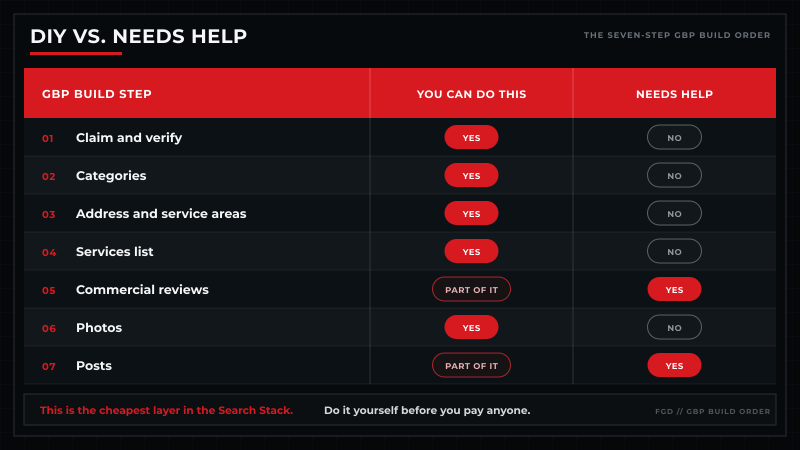
Here is what you can handle yourself.
| Step | You can do this | Needs help |
|---|---|---|
| 1. Claim and verify | Yes | No |
| 2. Categories | Yes | No |
| 3. Address and service areas | Yes | No |
| 4. Services list | Yes | No |
| 5. Commercial reviews | Part of it | Yes |
| 6. Photos | Yes | No |
| 7. Posts | Part of it | Yes |
Five of the seven you can handle. The two that break are reviews and posts, and not because they are hard.
They break because they have to survive a busy month. Anybody can ask for reviews on a slow month. Doing it every week in July, when three techs called in and you are behind on scheduling, is the part that fails.
Now, who this is not for.
If your work is mostly residential, this guide is aimed at the wrong buyer. If you do not have a website worth sending people to, fix that first. And if you want the phone ringing next week, this is not the lever. That is what ads are for.
Hiring makes sense at three specific points. You have more than one location. You have a suspension you cannot clear. Or the top three in your market are already well built, which means the easy version is over.
If that is where you are, we have a fire protection GBP service for you.
And this is one layer of a bigger system. The rest of it is in the complete fire protection marketing playbook.
No pitch. Just a clear look at where you rank in the map pack today, and what is missing from your profile.
Your Google Business Profile Checklist
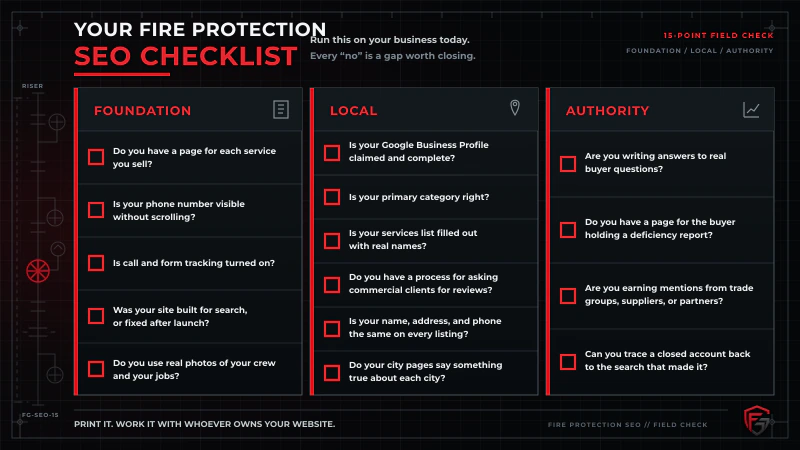
Run this on your profile today. Every “no” is a gap.
Setup
- Is your profile claimed and verified?
- Have you searched for duplicate listings?
- Is your primary category Fire protection service, or the right equivalent?
- Is your address hidden if buyers do not come to you?
- Are your service areas places you actually run services?
Signals
- Is your services list filled with the words buyers type?
- Does each service have a description naming who it is for?
- Do your photos show real commercial work?
- Are you collecting reviews from commercial clients?
- Do you reply to every review?
Upkeep
- Are you posting at least twice a month?
- Have you checked your rank from outside your own office?
- Can you tell whether the calls coming in are commercial?
- Have you read Google’s guidelines once?
Download the fire protection GBP checklist and work it with whoever owns your profile.
Google Business Profile FAQs
What category should a fire protection company use on Google?
Most should use Fire protection service as the primary category. That field decides which businesses you compete against, so it matters more than any other setting. Google also offers Fire alarm supplier, Fire protection consultant, Fire protection system supplier, and Fire protection equipment supplier. Use these as secondaries when relevant. Add only the ones you actually do. Extra categories you cannot back up water down your relevance.
How many service areas should I add to my profile?
Google allows up to 20, and expects them to be places you can actually reach. Fewer and truer beats more and hopeful. Setting your area to an entire state/province does not extend your reach, it dilutes it, and it looks like the kind of overreach that gets profiles suspended. Pick the markets your technicians already drive to in a normal week.
Do I have to show my address if I run the business from home?
No. If buyers do not come to you, you should hide the address and use a service area instead. You still give Google a real address so it can verify the business, it just is not displayed publicly.
Do homeowner reviews hurt a commercial fire protection company?
They do not damage your profile, but they do not help you win commercial work either. Reviews tell Google and the next buyer what kind of company you are. Fifty homeowner reviews describe a residential business. A handful of detailed reviews from facilities directors and property managers describe the one you actually want to grow.
How many Google reviews do I need to rank in the map pack?
There is no threshold. Anyone who gives you a specific number made it up. Google looks at reviews as part of prominence, alongside everything else people say about your business online. What moves the needle is a steady flow of real reviews over time, and reviews that name the service and the building type, rather than hitting a count.
Do Google Posts actually do anything?
Yes, but not the way social media does. Nobody is following your profile. A post shows Google and a buyer that the business is active, which feeds prominence. Once or twice a month can be enough. Consistency matters more than volume. Post about the commercial work you want more of, not company news nobody outside your office cares about.
What happened to the Q&A section on my Google Business Profile?
Google retired it. The Q&A feature was discontinued and replaced by an AI tool called Ask Maps, which answers questions using information from across the web rather than a list of questions you wrote yourself. This means most GBP advice online is now out of date. You cannot seed answers anymore, so your categories, services, reviews, and website are what feed it.
Can I have more than one profile if I have more than one branch?
Yes, if each location is genuinely staffed and operates as its own branch. Each one gets its own profile with its own address and phone number. What you cannot do is create separate profiles for service areas where you have no real presence. That is a duplicate listing, and it is one of the common reasons profiles get suspended.
Where to Start
Order matters. Claim it, then categories, then everything else. Step 2 decides what the rest can do.
This is the easiest work in the whole system, and the fastest to move.
The map pack has three slots. In your market they are already taken, usually by companies that did nothing clever. They filled the profile out properly and nobody else did.
Start by finding out where you actually stand. See where you rank in the map pack with a free fire protection marketing audit. We will show you who is above you and what is missing. No pitch. Just data.
Ready for a plan? Book your free strategy session. We will look at your market and map out how the FireGuard Search Stack fits your business. No pressure. Just a plan.
FireGuard Digital | Search marketing built for fire protection. By someone who knows the industry from both sides.